
Nurbid Tab-Tamer
Tame your Chrome Tabs!
Transform your browsing experience with Tab-Tamer. Organize, search, filter, manage, and control your Tabs and Tab Groups with powerful drag-and-drop functionality and intuitive controls.
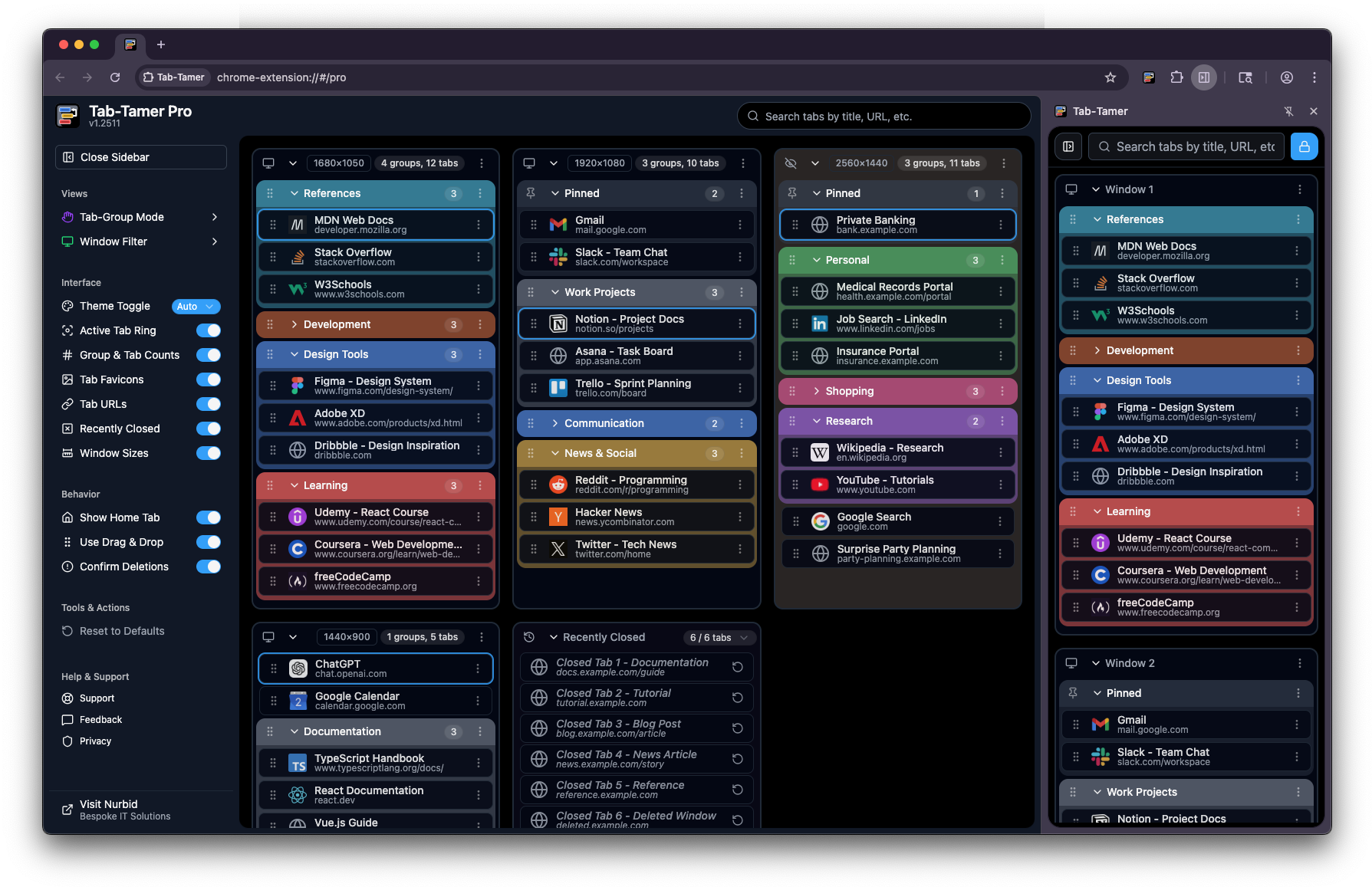
Tab-Group Mode
Control how tab groups display on load (Mirror Chrome, All Open, All Closed, or Manual)
Window Filter
Multi-select filtering to show/hide specific windows
Interface Settings
Customize appearance & layout by toggling on/off various elements
Behavior Settings
Configure core actions
Tools & Actions
(more coming soon!)
Help & Support
Support, feedback, privacy, etc.
Search & Filter Tabs
Real-time search and filtering of tabs by title, URL, or content
Multi-Window View
View and manage all browser windows in one unified interface
Show Window Sizes
See each window's pixel dimensions (H × W)
Pinned Tabs Section
Pinned tabs displayed separately at the top of each window
Incognito Support
Works seamlessly across regular and incognito windows
Color-Coded Groups
Visual organization with Chrome's native color-coding system
Group & Tab Counts
Badge counters showing number of tabs in groups and windows
Drag & Drop Reordering
Organized tabs and groups via drag-and-drop
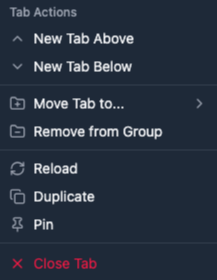
Actions Dropdowns
Context menus for windows, groups, and tabs with quick actions mirroring Chrome's native behaviors

Collapsible Window & Group Sections
Expand or collapse windows and tab groups to reduce clutter
Chrome Side Panel
Free version only loads in the Chrome Side Panel, Pro version can be accessed in the Side Panel or in a Pinned
Tab.
Feature Comparison
See exactly what you can do with each version.
(scroll to view full list)
Ready to tame your tabs?
Start for free, and upgrade when you need more power.
Tab-Tamer Free
Perfect for getting started
$0
Tab-Tamer Pro
You're ready to take charge!
$2.99/mo

Welcome to Tab-Tamer Pro!
What’s Next
Your license key will be sent to your email address within the next few minutes. Once you receive it:
- Open the Tab-Tamer extension
- Click “Already have a license?”
- Enter your license key (format: TT-PRO-XXXXXXXX-XXXXXX-XXXXXXXX)
- Start enjoying all Pro features!
Need Help?
- If you don’t receive your license key within 15 minutes, or if you have any questions, please contact us.
- We’re excited to help you transform your browsing experience!
Not ready Yet?
We understand that timing isn’t always right. Your purchase was cancelled and no charges were made.
Tab-Tamer Free is Still Available
- You can continue using Tab-Tamer’s free features right now – no license key needed!
Ready to Upgrade Later?
- When you’re ready to unlock Pro features to organize, search, filter, manage, and control your Tabs & Tab Groups with powerful drag-and-drop functionality and intuitive controls, you can upgrade anytime. Just visit our purchase page when you’re ready.
Have Questions?
- If you cancelled because you had questions or concerns, we’d love to help! Contact us and we’ll be happy to assist.